
LocalOnly
Cryze loveEntertainment
4.6274.00 Reviews
- Version
- 1.0.1
- Installs
- 50.00K
- Age Rating
- Mature 17+
Screenshots

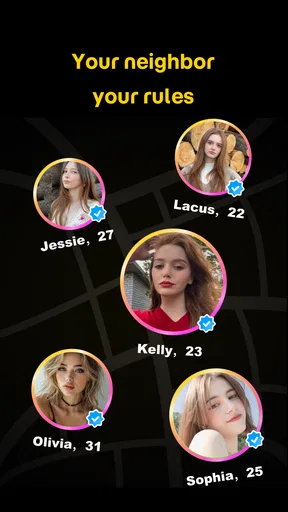
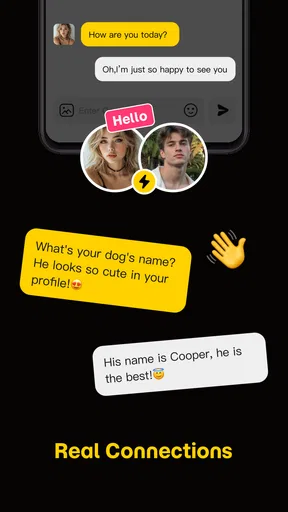


Our Review of LocalOnly
 Analysis by Appyee
LocalOnly caught my attention because it takes a very direct approach to entertainment: the experience is built around nearby people rather than a broad, polished social feed. The short store label is “LocalOnly,” while the longer summary points to a no-frills idea where the user has more control over who is nearby. That sounds simple, but simple apps often depend heavily on a smooth first setup. In my experience, the real question is not whether the concept is interesting; it is whether the app feels understandable and useful once you open it.
Developed by Cryze love, this free entertainment app is aimed at adults and carries a Mature 17+ rating. It has a 4.6 average from around 2.6 thousand ratings, with more than 50 thousand installs, so there is already a meaningful group of people trying it. The current version is 1.0.1, and it runs on Android 7.0 or later. Those details make it accessible to many older Android phones, although an older device may still make the first launch feel less responsive than it would on newer hardware.
Getting past the first points of friction
I find that the most useful way to approach the opening hurdles is to separate what I can control from what depends on the local setting. A calm first session lets me notice whether the app is responding properly without mistaking a quiet moment for a setup failure. From there, I can build a repeatable routine that makes it easier to tell a temporary lull from a problem worth troubleshooting.
Why the opening experience deserves patience
The biggest adjustment is understanding that LocalOnly is not trying to behave like a conventional entertainment feed. With a typical social or discovery app, you open it and immediately receive a large stream of recommendations, public content, or familiar account-based interactions. Here, the nearby focus changes the user’s expectations. A quiet screen, limited local activity, or a result that does not look immediately useful may reflect the nature of the app rather than a broken installation.
I would therefore avoid judging it during the first few seconds. Give the app time to present its local experience, read each prompt carefully, and resist tapping through setup just to reach the main screen. The phrase “your neighbor, your rules” suggests a more controlled environment, and that only works if you understand what you are choosing. A rushed setup can make the app feel empty or confusing when the real issue is simply that the initial choices were not made deliberately.
Another common stumbling block is expecting a local entertainment app to work exactly like a mainstream social network. It may not offer the same volume, rhythm, or instant variety. That trade-off is central to the concept: a smaller, more immediate circle can feel more relevant, but it can also feel sparse depending on where and when you use it. I see that as the first important decision point. If you want endless content from anywhere, the usual large platforms remain a better fit.
What I would check before blaming the app
Before using LocalOnly seriously, I would make sure the phone meets the Android requirement and has enough free space for a comfortable installation and update. The minimum operating system is Android 7.0, which covers a wide range of devices, but compatibility on paper does not guarantee an equally smooth experience on every handset. Phones with heavily modified Android interfaces can also place apps into aggressive battery-saving modes, and that can interfere with anything that depends on timely local activity.
I would also check the phone’s general connection and system settings before drawing conclusions from an empty or slow screen. A weak connection, restricted background activity, or a device that has been left running for a long time can produce symptoms that look like an app problem. The safest first check is straightforward: close the app normally, reopen it, and try again after confirming that the phone itself is responsive.
There is a practical privacy habit I recommend here. Because the app’s appeal is tied to nearby interaction, decide in advance how much local information you are comfortable sharing or using. Do not treat every nearby person as automatically trustworthy, and avoid moving a conversation into a more personal setting simply because the app makes someone feel geographically close. Local relevance is useful, but it should not replace ordinary judgment.
The age rating matters as well. LocalOnly is marked Mature 17+, so I would not install it on a child’s device or assume that its audience is suitable for younger users. That is not just a label to ignore during setup. Adults should still use common sense, especially when an entertainment app connects the idea of discovery with people in the surrounding area.
Handling a setup that does not seem to stick
If a choice appears not to have been saved, my first step would be to return to the relevant screen rather than repeatedly tapping the same control. Check whether the app has finished loading, then close and reopen it once. Repeated attempts while the phone is busy can create more confusion, particularly on an older device.
If the problem continues, I would restart the phone before taking more drastic action. A restart clears temporary system friction without immediately removing anything that may have been configured. I would only consider clearing app storage or reinstalling after thinking about what might be lost locally, because resetting an app can remove saved preferences or require the setup process to be completed again.
This is also where keeping expectations realistic helps. A local-focused service cannot create a meaningful nearby experience if there is little relevant activity around you at that moment. Reinstalling will not change the people in your area or the time of day. If the interface opens normally but the local results are quiet, that is a different situation from an app that crashes, freezes, or refuses to load.
Building a workflow that recovers cleanly
Once the basic flow is familiar, I focus on making each check-in deliberate rather than repeatedly reopening the app for a different result. I also keep recovery steps modest: confirm the phone is working, try again later, and avoid resetting anything before considering what might be lost. That practical distinction leads into a workflow for using the app without letting uncertainty or local quiet dictate the whole experience.
My recommended first-use routine
I would begin by using LocalOnly in a familiar, low-pressure place rather than testing it while travelling or rushing between appointments. That gives you time to understand what the app displays and how its local focus affects the experience. I would also keep the first session short. The aim is to learn the flow, not to force a complete social or entertainment routine immediately.
Once the basic screen makes sense, I would return at a different time and compare the experience. This is one of the more useful ways to evaluate the app because local activity can change naturally. A quiet result at lunchtime and a more active result later do not necessarily indicate inconsistent software. They may simply show the limits of a nearby audience.
For an everyday example, imagine finishing work and wanting something less anonymous than a national feed. I could open LocalOnly at home, look through what is relevant to my surroundings, and decide whether anything genuinely interests me. If I found something worth following up, I would keep the interaction inside the app until I had enough context to make a sensible decision. If nothing useful appeared, I would close it and return later instead of treating the lack of activity as a failure.
That workflow highlights a strength that is easy to miss: the app can be used as a selective check-in rather than an all-day habit. I do not think it needs to replace every other entertainment service. It makes more sense as a focused option for people who want local relevance and are willing to accept that the experience may vary from one session to the next.
What to do when the experience feels empty
An empty or uninteresting local screen is probably the most important recovery case. First, I would confirm that the main interface itself is working. If controls respond and the app remains stable, I would not immediately assume there is a technical fault. I would try again later, from another familiar location, and with a clear idea of what I am hoping to find.
The trade-off is different from a global platform. Large services smooth over quiet periods with enormous libraries and recommendation systems. LocalOnly appears designed around proximity, so its usefulness depends more on context. That can make the experience feel personal when it works, but it also means the app is not equally compelling in every neighborhood. Someone living in a highly active area may get much more from it than someone looking for constant variety in a quieter place.
I would also avoid turning the app into a test of popularity. The number of people nearby is not automatically a measure of quality, and a crowded local environment is not automatically safer or more enjoyable. My better test is whether the app helps me discover something relevant without making me feel pushed into interactions I do not want.
Separating app trouble from phone trouble
When an app behaves badly, I try to identify the pattern. If only LocalOnly is slow while other apps work normally, restarting it and checking for an available update is reasonable. If the entire phone is lagging, losing connection, or failing to respond, the app may simply be revealing a wider device problem. Freeing storage, restarting the phone, or checking the system connection can be more useful than repeatedly reinstalling one application.
Version 1.0.1 also tells me to keep expectations measured. This is an early version, so I would pay attention to ordinary usability issues and keep the app updated when a newer release becomes available through the normal store process. I would not build a complicated troubleshooting routine around assumptions about features or settings that are not visible in the app itself.
There is another practical distinction: a technical error is not the same as an uncomfortable interaction. If a person nearby behaves in a way that feels intrusive, the right response is to disengage and use the app more cautiously, not to continue because the service is intended for local discovery. Keep personal details private, avoid sharing a home address, and choose public settings for any real-world meeting. The app can support discovery, but it cannot make a stranger trustworthy.
Free to install, but not cost-free in every use
LocalOnly is free to download, which makes trying the basic experience relatively easy. However, it includes in-app purchases ranging from $9.99 to $179.99 per item. That is a wide enough range that I would check every purchase screen carefully before confirming anything. Free installation should not be confused with unlimited access to every possible part of the experience.
My advice is to use the free version long enough to decide whether the local concept actually fits your routine. Do not pay simply because the first session feels quiet, and do not assume a purchase will solve a lack of nearby activity. Money may unlock something useful for an engaged user, but it cannot change the basic reality that the app’s value depends on local relevance and personal comfort.
This pricing structure also makes LocalOnly less suitable for someone who wants a completely free, predictable entertainment tool. If you dislike optional purchases or prefer an app where the full experience is clear from the start, a conventional free media app may be easier to manage. On the other hand, users who understand the limits and treat purchases cautiously may find the free entry point convenient.
Who will enjoy it, and who should skip it
I think LocalOnly is best for adults who are curious about nearby discovery and prefer a narrower, more controlled experience over a huge public feed. It may suit someone who wants to check what is relevant around them without committing to a global platform’s constant stream. It is also a reasonable experiment for users who enjoy trying focused entertainment apps and are comfortable with a changing local atmosphere.
I would skip it if your main goal is endless content, a mature recommendation engine, or a guaranteed stream of activity at any hour. I would also avoid it if you are uncomfortable with the idea of location-adjacent social discovery, even when you can choose how much to participate. The app’s central idea is not a minor feature; it shapes the whole experience.
Compared with a standard social network, LocalOnly feels more limited but potentially more relevant. Compared with a streaming app, it offers less predictable entertainment and more dependence on context. Compared with a neighborhood message board, it appears more focused on immediate discovery than on long-form community information. None of those alternatives is universally better. The right choice depends on whether proximity is a benefit or an inconvenience for you.
My practical verdict
After looking at the full experience, I see LocalOnly as a focused entertainment app rather than a replacement for every social or media service on the phone. Its strongest idea is also its main limitation: keeping attention close to home can make discovery feel more personal, but it reduces the amount of content and activity available compared with large, established platforms.
I would recommend starting slowly, checking the phone and connection before troubleshooting, and testing the app at more than one time or place before deciding whether it works for you. Keep personal boundaries firm, treat the Mature 17+ rating seriously, and review in-app purchase screens with care. Those habits matter more here than chasing a perfect first session.
My bottom line is simple: LocalOnly is worth trying if nearby relevance matters more to you than endless variety. The free download lowers the barrier to testing it, while the strong average rating and growing install base suggest that many users find the idea appealing. Still, I would only recommend spending money after the everyday workflow feels useful on its own. For adults who want a local-first option and can accept uneven activity, it is an intriguing addition to an entertainment folder. For everyone else, a familiar global platform may remain the more dependable choice.
Verdict
Strengths of LocalOnly
- Works without an internet connection, improving privacy and reliability.
- Keeps selected data stored locally on the device.
- Useful in areas with weak or unavailable mobile coverage.
- Simple concept with minimal setup for offline use.
- Can reduce mobile data consumption and background syncing.
Limitations of LocalOnly
- Local data may be lost if the device fails or is reset.
- No automatic cloud backup or cross-device synchronization.
- Sharing information with other users may be limited.
- Storage use can increase as more content is saved locally.
- Some features may depend on the specific app or device support.
Similar Picks in This Category
View All
Google Play Games
Google LLC3.9

Netflix
Netflix, Inc.4.8

YouTube Kids
Google LLC4.2

Disney+
Disney4.4

Prime Video
Amazon Mobile LLC4.7

Steam
Valve Corporation3.2
Frequently Asked Questions
What is LocalOnly and what can I use it for?
LocalOnly is designed for sharing and transferring content between nearby devices without relying on a traditional cloud service. Depending on the supported features and device permissions, it may let you exchange files, messages, or other data over a local connection. It is especially useful when you want to keep information within your local network or avoid uploading private content to external servers.
Does LocalOnly require an internet connection to work?
The main purpose of LocalOnly is local communication, so many of its core functions can work without mobile data or a direct internet connection. However, the exact requirements depend on the feature being used and the connection method supported by your device, such as Wi-Fi or a local hotspot. Initial downloads, updates, or optional online services may still require internet access.
Is LocalOnly safe for sharing private files and information?
LocalOnly can offer greater privacy than services that automatically upload content to the cloud because transfers are intended to remain on a local connection. Nevertheless, privacy also depends on your network security, device settings, and the people you allow to connect. Before sharing sensitive material, verify the recipient, use a trusted network, and review the permissions requested by the app.
Which devices and platforms are compatible with LocalOnly?
Compatibility depends on the version of LocalOnly available for your operating system and the connection features supported by your phone or tablet. Before downloading, check the official store listing for Android or iOS requirements, supported operating-system versions, and any limitations between platforms. Some functions may work differently when connecting devices from different manufacturers or operating systems.
What permissions does LocalOnly request, and can I use it without granting them all?
A local-sharing application may request access to nearby devices, Wi-Fi or network information, files, photos, Bluetooth, or local-network discovery. These permissions are generally connected to finding devices and transferring content, but the exact list varies by platform. You can review and manage permissions in your device settings, although denying essential access may prevent certain LocalOnly features from functioning correctly.
